



Wallets hold your secrets: the seed recovery phrases, seeds, and private keys that allow you to access your assets. But they don’t necessarily offer resilience, and there’s ultimately no one to help you if you lose your secrets.
The following demonstrates how to interoperate with MetaMask to improve the resilience of your Ethereum funds while maintaing your privacy, using two Blockchain Commons technologies: Envelope and SSKR.
Extracting Secrets from Metamask
When you work with Metamask, you will create wallets and within them accounts, each of which can generate individual addresses.
- A Seed Recovery Phrase can be used to restore a wallet.
- A Private Key is derived from a seed and can be used to access an account address.
It is beneficial to privacy to use multiple accounts, each one for a different purpose on the Ethereum network (e.g., one for a DAO, one for game-related spending, one for a trip out of country, etc). But you might be unwilling to because of the fear of losing an account. That’s where resilience comes in: by backing up your secrets, you can lower the fear of loss and so encourage better privacy practices.
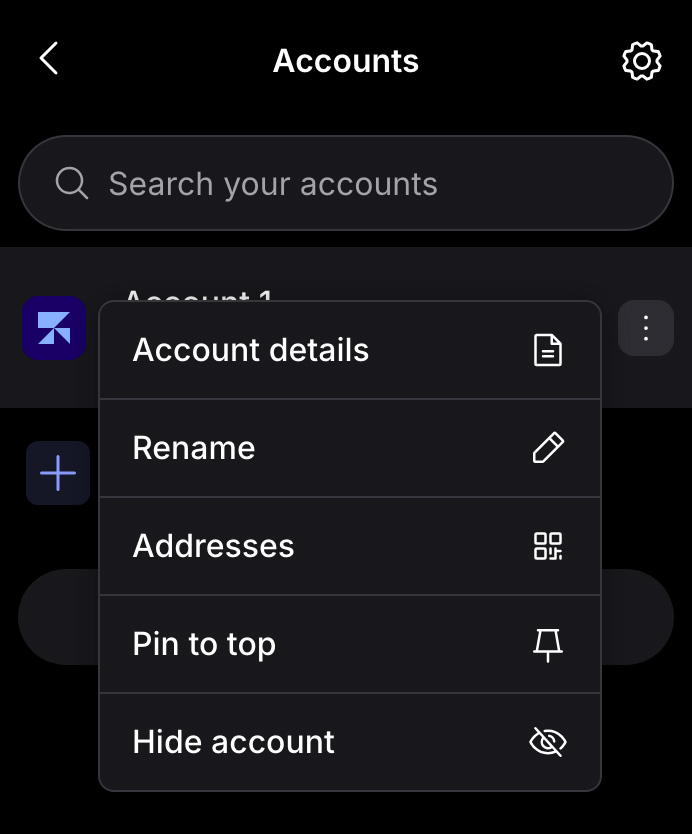
Accessing secrets on Metamask is simple:
- Click the down arrow next to your current account.
- Click the “…” next to the account you want to access.
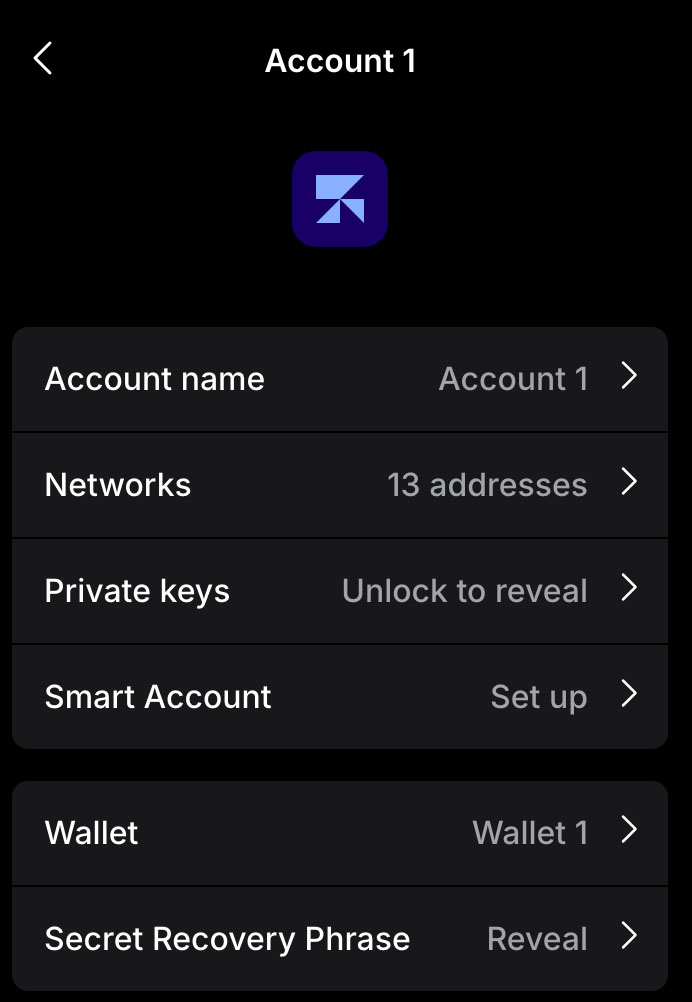
- Choose “Account Details”.
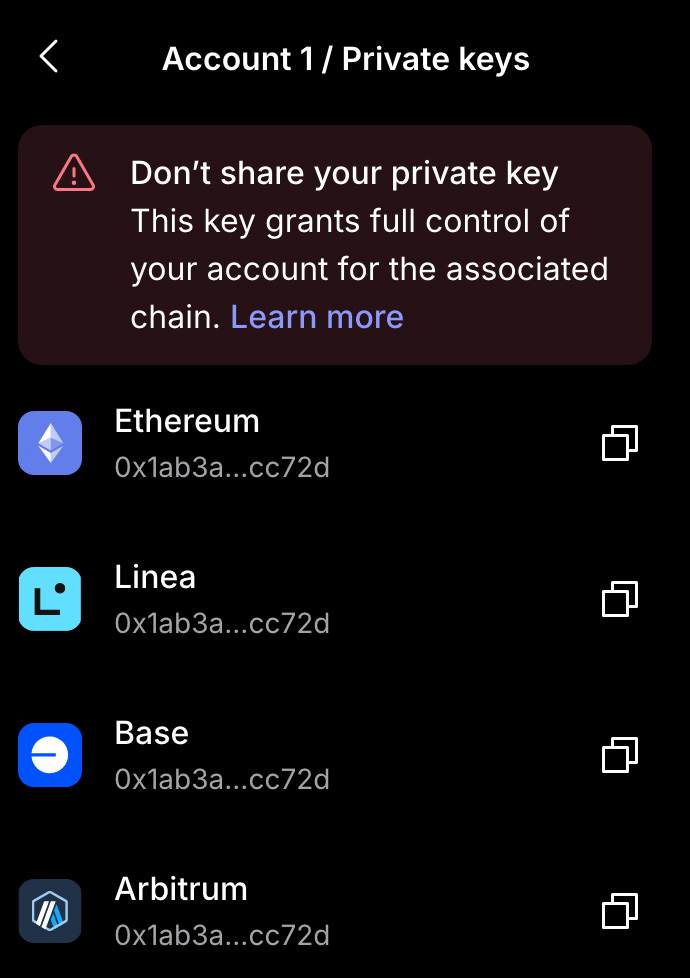
- To access the private keys for an account, choose “Private Keys”.
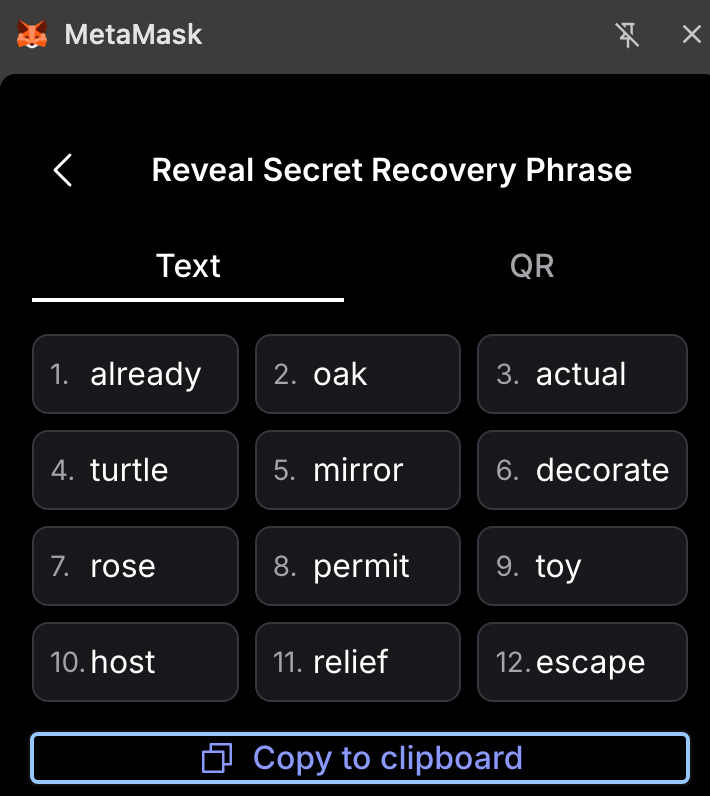
- To access the seed recovery phrase for a wallet, choose “Secret Recovery Phrase”.
When working with your secrets, be sure you’re in a private place that can’t be surveiled. On a modern computer, Metamask will require your biometrics to unlock a passkey. Afterward, you can use a secure computer to back them up using Envelope and SSKR.
|
|
|
|
Storing with Gordian Envelope
Gordian Envelope is a Smart Envelope system that allows you to securely store information with metadata. This allows you to not only make a backup of your secrets, but also to add information about the secrets, so that you can later have a better chance at recovering them.
Installing Gordian Envelope
Gordian Envelope is available as a CLI that is installed from a Rust crate:
cargo install bc-envelope-cli
Developers can also use the Gordian Envelope libraries to build their own tools:
Once you have installed Gordian Envelope, you’ll be able to store information in it. This is done by adding subjects and then assertions, made up of predicate and an object, about those subjects.
Storing a Recovery Phrase
If you “Copy to Clipboard” your Secret Recovery Phrase, it will look as follows:
already oak actual turtle mirror decorate rose permit toy host relief escape
You can store that in an Envelope as a subject:
envelope subject type string "already oak actual turtle mirror decorate rose permit toy host relief escape"

| ur:envelope/tpsoksgshsjzjpihhsiekkcxjlhsjecxhsiajykphsjzcxjykpjpjyjzihcxjninjpjpjljpcxieihiajljphsjyihcxjpjljkihcxjoihjpjninjycxjyjlkkcxisjljkjycxjpihjzinihiycxihjkiahsjoihlnpeiedt
Rather than showing all the output, we’re going to store everything in variables for easier reuse.
RECPHRASE=$(envelope subject type string "already oak actual turtle mirror decorate rose permit toy host relief escape")
You can then add assertions that subject, describe what you’re storing so you know what it is in the future.
RECPHRASE=$(envelope assertion add pred-obj known 'isA' string "recoveryPhrase" $RECPHRASE)
RECPHRASE=$(envelope assertion add pred-obj known 'asset' known 'Ethereum' $RECPHRASE)
Some of these assertions are of type “string” (a freeform description), but others are of type “known”, which is a specifically defined known value. You could use strings for everything, but using known values when they exist improves the inteoperability of your data, and so the likelihood of recovering it in the future.
After you’ve filled out your envelope, you can use envelope format
to see its complete contents:
envelope format $RECPHRASE

| "already oak actual turtle mirror decorate rose permit toy host relief escape" [
|     'isA': "recoveryPhrase"
|     'asset': 'Ethereum'
| ]
You’ve successfully backed up your recovery phrase along with a description of what it is! You could add more details, for example what accounts you created, with the exact format depending on what you will need in the future to get from this raw data (the secret) to your actual assets.
Storing a Private Key
Another option is just to store the private key for an address you’re using.
RECKEY=$(envelope subject type string "2cebbeb69d8f390f709bde1d571a44ee09446d18d7f07f21fb8dc72de786c00f")
RECKEY=$(envelope assertion add pred-obj known 'isA' known 'PrivateKey' $RECKEY)
RECKEY=$(envelope assertion add pred-obj known 'asset' known 'Ethereum' $RECKEY)

envelope format $RECKEY

| "2cebbeb69d8f390f709bde1d571a44ee09446d18d7f07f21fb8dc72de786c00f" [
|     'isA': 'PrivateKey'
|     'asset': 'Ethereum'
| ]
Encrypting Your Data
Obviously, you don’t want to leave your secrets sitting around in plain text. You can generate a new symmetric key and use that to encrypt your envelopes:
SKEY=$(envelope generate key)

RECPHRASE_ENC=$(envelope encrypt --key $SKEY $RECPHRASE)
RECKEY_ENC=$(envelope encrypt --key $SKEY $RECKEY)
There’s a catch here! Encryption only encrypts the subject, not the assertions:
envelope format $RECPHRASE_ENC

| ENCRYPTED [
|     'isA': "recoveryPhrase"
|     'asset': 'Ethereum'
| ]

envelope format $RECKEY_ENC

| ENCRYPTED [
|     'isA': 'PrivateKey'
|     'asset': 'Ethereum'
| ]
This is a purposeful design! In this situation, your secret (the recovery phrase or private key) is encrypted, but your metadata about it is not. This means that you can include metadata that might help you recover your secret (for example, by telling you where the symmetric encryption key is!).
Decrypting Your Data
As long as you have that symmetric key, you’ll be able to decrypt your data:
envelope decrypt -k $SKEY $RECPHRASE_ENC | envelope format

| "already oak actual turtle mirror decorate rose permit toy host relief escape" [
|     'isA': "recoveryPhrase"
|     'asset': 'Ethereum'
| ]
The trick, of course, is holding on to the key.
Encrypting the Whole Envelope
If you prefer, you can encrypt the whole envelope. This is done by “wrapping” the envelope (which turns the full body into the subject), then encrypting that.
RECPHRASE_FULLENC=$(envelope subject type wrapped $RECPHRASE | envelope encrypt --key $SKEY)

envelope format $RECPHRASE_FULLENC

| ENCRYPTED
This is what makes envelope very powerful as a privacy tool. You get to decide exactly the level of privacy that every element of your data deserves.
Building Up an Envelope
You can build an envelope up from several parts. For example, the following would allow you to put all your Ethereum secrets together, along with the symmetric key you need for decryption:
ETHEREUM=$(envelope subject type string "Ethereum Secrets")
ETHEREUM=$(envelope assertion add pred-obj string "secret" envelope $RECPHRASE_ENC $ETHEREUM)
ETHEREUM=$(envelope assertion add pred-obj string "secret" envelope $RECKEY_ENC $ETHEREUM)
ETHEREUM=$(envelope assertion add pred-obj string "symmetricKey" ur $SKEY $ETHEREUM)
Here’s what that looks like:
envelope format $ETHEREUM

| Ethereum Secrets" [
|    "secret": ENCRYPTED [
|        'isA': "recoveryPhrase"
|        'asset': 'Ethereum'
|    ]
|    "secret": ENCRYPTED [
|        'isA': 'PrivateKey'
|        'asset': 'Ethereum'
|    ]
|    "symmetricKey": 40023(h'76f7695d0bde9fc209ae4577509fbcabfb3162595689df8c1fbe9ef26e8953fd')
But again, you don’t necessarily want to leave that symmetric key hanging around.
Eliding a Secret
That’s where Envelope’s last privacy feature comes in: elision. Data can be removed after you’ve made an envelope.
This is done by finding the hash of the object to remove, in case the actual symmetric key:
KEY_DIGEST=$(envelope assertion find predicate string "symmetricKey" $ETHEREUM| envelope extract object | envelope digest)
You then elide it:
ETHEREUM_ELIDED=$(envelope elide removing $KEY_DIGEST $ETHEREUM)
Here’s the result:
envelope format $ETHEREUM_ELIDED

| "Ethereum Secrets" [
|     "secret": ENCRYPTED [
|         'isA': "recoveryPhrase"
|         'asset': 'Ethereum'
|     ]
|     "secret": ENCRYPTED [
|         'isA': 'PrivateKey'
|         'asset': 'Ethereum'
|     ]
|     "symmetricKey": ELIDED
| ]
So why is this useful? Because eliding content from an envelope leaves the hash of that content. That means you can later go through all your symmetric keys (stored securely elsewhere) and find the one that matches the hash in your Ethereum envelope. You then know it’s the right one to restore these secrets!
Great privacy! But great resilience too!
Securing Your Secrets with SSKR
You don’t want your secrets sitting around in plain text, unprotected. But encrypting them might just be kicking the can down the road: your Ethereum secrets might now be well protected, but they could still be lost if you lose your symmetric encryption key.
Shamir’s secret sharing, available in an expanded form through Blockchain Commons’ SSKR offers a solution. Rather than symmetrically encrypting your envelope, you shard it. This creates a number of shares of your envelope, but nothing can be determined about the content of the envelope unless a threshold of them are brought back together. 2 of 3 is a common sharding technique. That means that you create three shares and can reconstruct your envelope from any two of them.
SSKR is built into the envelope-cli tool, so you can shard an
envelope with a single command:
envelope sskr split $RECPHRASE -g 2-of-3

| ur:envelope/lftansfwlrhdjlbnfdrkahchaypfcyotbthhoxsfhhrfoxylnegwgtetmnftyltpptcpltgaroqzrewdotceksgdjzatpmyllfaoftroemrlmupyemutrlgrpfeslosahfhfyldtaavlmwkprfghldgubgpdkpqdosrolgdyjyiototefliowzyntkdmghjymdlnrnrectrpknsosnrkgmqdntcyhpemfhtsyteokoglgsfresntfxuedeknckkghhkivygdjocfwszsbdghfzbtahhstlcthepdfxoshddatansfphdcxgdonsnieztwmykzocmmuoynnwzsoatnefpyndtfglrcmtpuyistkmkpsseieimdpoyamtpsotantkphddasnksaeadaeecnnwphlbghgjkutjzrsztmysocltttbaaltenwfzehliygdynkioljkjoswsoflesmtckay ur:envelope/lftansfwlrhdjlbnfdrkahchaypfcyotbthhoxsfhhrfoxylnegwgtetmnftyltpptcpltgaroqzrewdotceksgdjzatpmyllfaoftroemrlmupyemutrlgrpfeslosahfhfyldtaavlmwkprfghldgubgpdkpqdosrolgdyjyiototefliowzyntkdmghjymdlnrnrectrpknsosnrkgmqdntcyhpemfhtsyteokoglgsfresntfxuedeknckkghhkivygdjocfwszsbdghfzbtahhstlcthepdfxoshddatansfphdcxgdonsnieztwmykzocmmuoynnwzsoatnefpyndtfglrcmtpuyistkmkpsseieimdpoyamtpsotantkphddasnksaeadadsnpfbyztsrdpeobkatceztahiansrdtetllkaeiennlygmbemnwttbwtaolossfrhednfnol ur:envelope/lftansfwlrhdjlbnfdrkahchaypfcyotbthhoxsfhhrfoxylnegwgtetmnftyltpptcpltgaroqzrewdotceksgdjzatpmyllfaoftroemrlmupyemutrlgrpfeslosahfhfyldtaavlmwkprfghldgubgpdkpqdosrolgdyjyiototefliowzyntkdmghjymdlnrnrectrpknsosnrkgmqdntcyhpemfhtsyteokoglgsfresntfxuedeknckkghhkivygdjocfwszsbdghfzbtahhstlcthepdfxoshddatansfphdcxgdonsnieztwmykzocmmuoynnwzsoatnefpyndtfglrcmtpuyistkmkpsseieimdpoyamtpsotantkphddasnksaeadaouesabtaapyotwfisrdvoztlalnfzatuorymehtswfmzebatiamkefgjtmwhtterskkbghfzt
You would then send those individual envelopes out to distinct and secure locations. For example, you might keep one on your laptop and one in cloud storage (that your laptop is not logged into). Then you could convert the third to a QR code and print that out and put it in your safe.
When you later bring your shares back together, you can reconstruct your envelope from any two:
RESTORED=$(envelope sskr join ur:envelope/lftansfwlrhdjlbnfdrkahchaypfcyotbthhoxsfhhrfoxylnegwgtetmnftyltpptcpltgaroqzrewdotceksgdjzatpmyllfaoftroemrlmupyemutrlgrpfeslosahfhfyldtaavlmwkprfghldgubgpdkpqdosrolgdyjyiototefliowzyntkdmghjymdlnrnrectrpknsosnrkgmqdntcyhpemfhtsyteokoglgsfresntfxuedeknckkghhkivygdjocfwszsbdghfzbtahhstlcthepdfxoshddatansfphdcxgdonsnieztwmykzocmmuoynnwzsoatnefpyndtfglrcmtpuyistkmkpsseieimdpoyamtpsotantkphddasnksaeadadsnpfbyztsrdpeobkatceztahiansrdtetllkaeiennlygmbemnwttbwtaolossfrhednfnol ur:envelope/lftansfwlrhdjlbnfdrkahchaypfcyotbthhoxsfhhrfoxylnegwgtetmnftyltpptcpltgaroqzrewdotceksgdjzatpmyllfaoftroemrlmupyemutrlgrpfeslosahfhfyldtaavlmwkprfghldgubgpdkpqdosrolgdyjyiototefliowzyntkdmghjymdlnrnrectrpknsosnrkgmqdntcyhpemfhtsyteokoglgsfresntfxuedeknckkghhkivygdjocfwszsbdghfzbtahhstlcthepdfxoshddatansfphdcxgdonsnieztwmykzocmmuoynnwzsoatnefpyndtfglrcmtpuyistkmkpsseieimdpoyamtpsotantkphddasnksaeadaouesabtaapyotwfisrdvoztlalnfzatuorymehtswfmzebatiamkefgjtmwhtterskkbghfzt)

envelope format $RESTORED

| "already oak actual turtle mirror decorate rose permit toy host relief escape" [
|     'isA': "recoveryPhrase"
|     'asset': 'Ethereum'
| ]
This is the ultimate in resilience and privacy. Your secrets are protected from a Single Point of Failure (SPOF) because you have redundant copies: any two will restore. But your privacy is also protected, securing you against a Single Point of Compromise (SPOC) because an adversary recovering a single one of your shares learns nothing.